


In 2026, the technology landscape continues to evolve with increasing demands for efficiency, creativity, and connectivity. The Apple MacBook Neo emerges as a pivotal device for students, developers, and creators looking for a versatile, powerful, and aesthetically pleasing laptop. But is it worth the investment? Let’s dive into a comprehensive review.
Designed for those who value premium technology, the MacBook Neo promises to deliver the speed, performance, and reliability that Apple is known for. It's equipped to handle intensive tasks like video editing, coding, and intricate design work, potentially making it the go-to choice for many.
- Students - Benefit from the lightweight design and powerful performance for academic tasks.
- Developers - Enjoy seamless multitasking and efficient coding environments.
- Creators - Exploit high-resolution graphics and fast processing for creative projects.
Table of contents
- Overview & first impressions
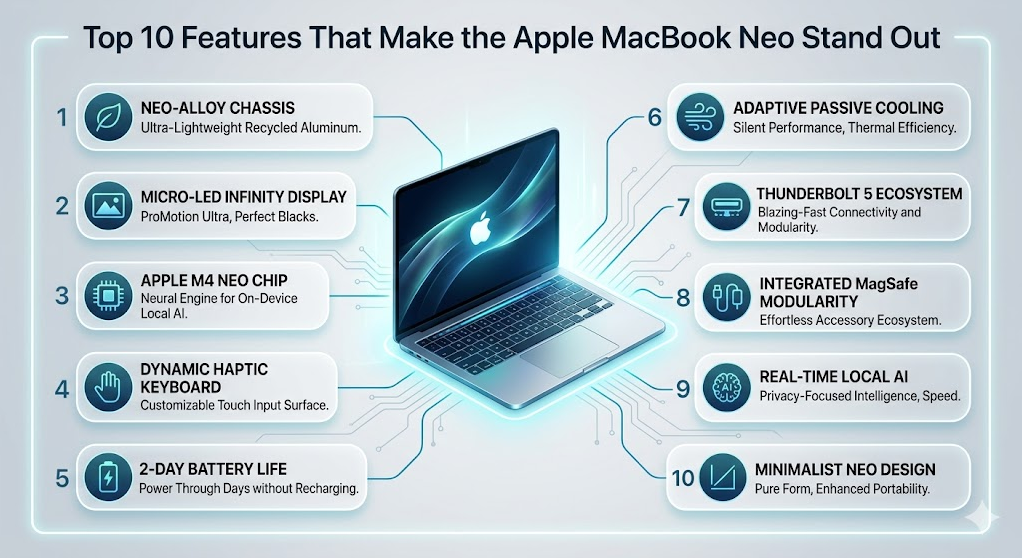
- Key features
- Specs at a glance
- Pros and cons
- Who should buy it — who should skip
- Tips, settings, and accessories
- Alternatives
- FAQs
- Verdict / final recommendation
Overview & first impressions
The Apple MacBook Neo introduces a sleek and futuristic design, maintaining Apple’s signature minimalistic aesthetic. Available in a new ultrafine metallic finish, it fits effortlessly into settings from lecture halls to corporate boardrooms. The unboxing experience remains premium, with the MacBook Neo tightly packaged alongside essential accessories like the new MagSafe charger and USB-C adapters.
First-time users will notice the intuitive setup process powered by Apple's latest macOS version, streamlining the migration of old files and settings. The feel of the keyboard, now with enhanced tactile feedback, and the expansive Force Touch trackpad offer a smooth user interface, ensuring that the MacBook Neo is not just a pretty face but a functional beauty.
Key features
Advanced M3 Chip
At the heart of the MacBook Neo is Apple’s revolutionary M3 chip. This chip not only promises faster processing speeds but also enhances energy efficiency, leading to prolonged battery life. Expect rapid software launches and minimal lag with demanding applications.
Retina XDR Display
The display is a showstopper with its immersive Retina XDR technology, offering over 6 million pixels and wider color gamut. Whether editing a 4K video or perusing through photography portfolios, the display ensures vibrant, true-to-life colors.
- High dynamic range for brighter whites and deeper blacks.
- Antireflective coating for use in any lighting condition.
- True Tone technology that adjusts display tone based on surrounding light.
Enhanced Security & Privacy
The MacBook Neo features advanced security measures including Touch ID for quick logins and enhanced encryption protocols to protect sensitive data. With Apple's commitment to privacy, users are assured their information remains secure.
Spatial Audio Speakers
For audio enthusiasts, the Neo's spatial audio technology transforms any location into a soundstage. The speakers deliver an immersive experience with crisp sound clarity, supporting spatial audio compatibility with most streaming services.
Specs at a glance
| Specification | Details |
|---|---|
| Processor | Apple M3 chip |
| Display | 13.3-inch Retina XDR Display |
| Memory | 8GB/16GB unified memory |
| Storage | 256GB/512GB/1TB SSD |
| Battery Life | Up to 18 hours |
| Weight | 2.6 pounds |
Pros and cons
Pros
- Exceptional build quality and design.
- High-performance M3 chip for multitasking.
- Superior Retina XDR display for creative work.
- Long-lasting battery life for extended usage.
- Robust security features, including Touch ID.
Cons
- Price point may deter budget-conscious consumers.
- Limited ports may necessitate additional adapters.
- 8GB base memory may be insufficient for some power users.
Who should buy it — who should skip
The Apple MacBook Neo is tailored for those seeking a high-performance, aesthetic, and reliable laptop. Here’s who we think this laptop best suits:
- Students: Need durable and long-lasting battery life for all-day campuses.
- Developers: Require fast processing for coding and software development.
- Content Creators: Benefit from superior graphics and display for creative projects.
However, not everyone may find the MacBook Neo to be the best fit:
- Budget Seekers: Might find better value in less expensive models.
- Port Necessitators: Who depend on numerous external connections without excess dongles.
Tips, settings, and accessories
To maximize the MacBook Neo’s capabilities, consider the following tips and companion products:
- Utilize built-in Night Shift for better night-time screen usage.
- Pair with the Apple Magic Mouse 2 for enhanced navigation experience.
- Use the Belkin Thunderbolt 3 Dock for expanded connectivity options.
- Explore third-party apps like ‘Magnet’ for advanced multitasking windows management.
Alternatives
Despite the capabilities of the MacBook Neo, some might find alternatives more suited to their needs:
The Dell XPS 13 offers similar performance characteristics, notable for its display and build quality, at a marginally lower price point.
The Microsoft Surface Laptop 5 stands out with strong productivity features and a touch-enabled display, catering particularly well to those integrated into the Windows ecosystem.
FAQs
Is the MacBook Neo suitable for gaming?
While optimized for creative and productivity tasks, casual gaming is possible, but it isn't specialized for high-end gaming performance.
How does the battery life perform under heavy usage?
The MacBook Neo maintains impressive battery performance, offering about 12-15 hours under intensive activities.
Does the MacBook Neo support external GPUs?
No, it does not inherently support external GPUs, but its internal GPU is well-optimized for typical tasks.
What makes the MacBook Neo’s display special?
The Retina XDR display offers high resolution and exceptional color accuracy, perfect for media consumers and creators who need precise visuals.
Can I upgrade the RAM or SSD?
No, the RAM and SSD are soldered to the motherboard, hence non-upgradable. Selection should be thoughtfully made at purchase based on future needs.
Is there an option for more ports?
While the Neo has limited ports, third-party hubs and docks can expand connectivity to ensure device compatibility.
Verdict / final recommendation
The Apple MacBook Neo excels as a laptop for students, developers, and creators looking for a reliable, high-performance device. It’s a perfect companion for those who prioritize design and need a machine capable of handling intense workloads with ease. However, its price and configuration might not suit everyone, especially those on a budget or with specific port needs. All in all, if you’re within Apple’s desired demographic and can invest in quality, the MacBook Neo stands out as a worthwhile choice.
- Buy if you prioritize performance and design.
- Potentially unsuitable for those seeking maximum affordability.
- Consider compatible accessories to enhance versatility.
Extended Use Cases
The Apple MacBook Neo is not just a workstation for academic, development, and creative purposes; it serves multiple other use cases effectively. Professionals working in finance or data analysis benefit greatly from its robust processing capabilities. The M3 chip enables swift calculations, making complex modeling tasks smoother and more time-efficient. Artists and designers find the high-resolution Retina XDR display invaluable for color-accurate imagery and design precision. With the explosion of remote work and digital nomad lifestyles, the MacBook Neo's light weight and durability make it an ideal travel companion for those frequently on the move.
Long-Term Ownership Notes
Owning a MacBook Neo in the long term means embracing a commitment to ongoing software and system improvements, courtesy of Apple's meticulous updates. Over several years, users report excellent durability and minimal performance degradation, largely due to the quality of manufacturing and thoughtful OS enhancements. Each macOS upgrade typically introduces new functionalities or optimizations that make the aging hardware feel rejuvenated, enhancing the longevity of your investment. Additionally, Apple's customer service and support, known for efficiency and expertise, provide peace of mind when maintenance or issues arise.
Deeper FAQ Answers
What about the environmental impact?
Apple has made strides in reducing the environmental impact of its products, including the MacBook Neo. It features an enclosure made of 100% recycled aluminum and is ENERGY STAR certified. The improved energy efficiency of the M3 chip also contributes to a lower carbon footprint over the device's lifespan.
How does it integrate with other Apple devices?
The MacBook Neo flawlessly integrates with the Apple ecosystem. Features like AirDrop, Handoff, and iCloud ensure seamless connectivity and data synchronization across devices. Continuity Camera and Universal Clipboard enhance cross-device functionality, making it easy to take advantage of multiple Apple products harmoniously.
Troubleshooting
While the MacBook Neo is designed with Apple’s characteristic reliability, occasional troubleshooting might be required. Common issues include Wi-Fi connectivity glitches, often solvable by resetting the network settings or adjusting the DNS configuration. Another reported concern is battery performance; recalibrating the battery or updating to the latest macOS can generally resolve such problems. Software lags are rare but clearing cache or freeing up hard drive space can improve speed. If these steps are insufficient, consulting Apple Support or visiting an Apple Store provides professional guidance.
Accessories That Pair Well
To fully equip your MacBook Neo, consider the following accessories. The Apple Magic Keyboard delivers an ergonomic typing experience, especially beneficial during intense coding or writing sessions. The Logitech MX Master 3, known for precision tracking and workflow customization, enhances navigation and productivity. For storage expansion, the SanDisk Extreme Portable SSD offers fast, reliable backup solutions, ideal for creators dealing with large files. Each of these accessories complements the capabilities of the MacBook Neo seamlessly, offering a richer user experience.
Longer Verdict
Overall, the Apple MacBook Neo stands out not just as a potent device for its core audience of students, developers, and creators, but also as a multifaceted asset in various professional environments. The blend of performance, style, and the robust Apple ecosystem make it more than just a laptop. The primary deterrent remains its price, which may steer budget-minded consumers towards alternative options. For those prioritizing seamless operation, high-quality design, and software support, the MacBook Neo justifies its premium position, cementing itself as a reliable choice for diverse computing needs.





No comments yet. Be the first to comment!